Showing posts with label Extjs. Show all posts

Sunday, July 5, 2015

ExtJS - Simple ExtJS Grid

ExtJS Grid


As mentioned above, the job of  EXT JS grid to display the data and provides the functionality of the grid.
The purpose of the Ext.data.Store is fetching the data and maintains the data for the component.

Ext Data Model

Ext.data.Model represents the data model or data structure of  Ext.data.Store.


Ext.define('Employee', {
    extend: 'Ext.data.Model',
    fields: [ 'name', 'designation', 'age' ]
});

Ext Data Store
Ext.data.Store is the instance of data model Employee

var empStore = Ext.create('Ext.data.Store', {
    model: 'Employee',
    data: [
        { name: 'Sathish', email: 'sathish@example.com', phone: '555-111-1224' },
        { name: 'Vinod', email: 'vinod@example.com', phone: '555-222-1234' },
        { name: 'Nagamuthu', email: 'naga@example.com', phone: '555-222-1244' }
    ]
});

Now Ext.data.Model Employee and Ext.data.Store is available to populate the data in Ext.grid.Panel.

Following snippet explains how to make use of Ext.data.Store  to display the data in Ext.grid.Panel.

Ext.create('Ext.grid.Panel', {
    renderTo: Ext.getBody(),
    store: empStore,
    width: 400,
    height: 200,
    title: 'Employee details',
    columns: [
        {
            text: 'Name',
            width: 100,
            sortable: false,
            hideable: false,
            dataIndex: 'name'
        },
        {
            text: 'Designation',
            width: 150,
            dataIndex: 'designation',
            hidden: true
        },
        {
            text: 'Age',
            flex: 1,
            dataIndex: 'age'
        }
    ]
});


ExtJS Simple Grid Sample

Thursday, July 2, 2015

ExtJS - Border Layout

  • Border layout allows you you to create a layout based on the regions.
  • Layout needs to be allocated as regions
  • Typical ExtJS application has border layout has initial layout

    Following are the  regions defined in border layout
    • East
    • West  
    • Center - Main Content
    • North  - Header
    • South  - Footer
     
              {  id:'border-panel',
                title: 'Border Layout',
                layout: 'border',
                bodyBorder: false,
                defaults: {
                    collapsible: true,
                    split: true,
                    animFloat: false,
                    autoHide: false,
                    useSplitTips: true,
                    bodyStyle: 'padding:15px'
                },
                items: [{
                    title: 'Footer',
                    region: 'south',
                    height: 150,
                    minSize: 75,
                    maxSize: 250,
                    cmargins: '5 0 0 0',
                    html: '<p>Footer content</p>'
                },{
                    title: 'Navigation',
                    region:'west',
                    floatable: false,
                    margins: '5 0 0 0',
                    cmargins: '5 5 0 0',
                    width: 175,
                    minSize: 100,
                    maxSize: 250,
                    html: '<p>Secondary content like navigation links could go here</p>'
                },{
                    title: 'Main Content',
                    collapsible: false,
                    region: 'center',
                    margins: '5 0 0 0',
                    html: '<h1>Main Page</h1><p>This is where the main content would go</p>'
                }]
            },


Wednesday, July 1, 2015

ExtJS - Anchor Layout

  • Extjs Provides anchoring of contained items to the container's edges.
  • This type of layout is most commonly seen within FormPanels (or any container with a FormLayout) Fields are sized relative to the container without hard-coding their dimensions.

{
            id:'anchor-panel',
            title: 'Astute Anchor Layout',
            layout:'anchor',
            defaults: {bodyStyle: 'padding:15px'},
            items: [{
                title: 'Astute Panel 1',
                height: 100,
                anchor: '50%',
                html: '<p>Width = 50% of the container</p>'
            },{
                title: 'Astute Panel 2',
                height: 100,
                anchor: '-100',
                html: '<p>Width = container width - 100 pixels</p>'
            },{
                title: 'Panel 3',
                anchor: '-10, -262',
                html: '<p>Width = container width - 10 pixels</p><p>Height = container height - 262 pixels</p>'
            }]
        }

ExtJs - Accordion Layout


  • Extjs provides the layout property to achieve the accordion Menu.
  • Defining layout as Accordion and adding elements is enough to make accordion menu.
  • There  is no extra configuration for accordion menu.

            {
            id: 'accordion-panel',
            title: Astute Accordion Layout',
            layout: 'accordion',
            bodyStyle: 'background-color:#DFE8F6', 
            defaults: {bodyStyle: 'padding:15px'},
            items: [{
                title: 'Astute Introduction',
                tools: [{type:'gear'},{type:'refresh'}],
                html: '<p>Here is some accordion content.  Click on one of the other bars below for more.</p>'
            },{
                title: 'Astute Basic Content',
                html: '<br /><br /><p>More content.  Open the third panel for a customized look and feel example.</p>',
                items: {
                    xtype: 'button',
                    text: 'Show Next Panel'
                }
            },{
                id: 'acc-custom',
                title: 'Astute Custom Html Panel ',
                html: '<p>HTML Content</p>'
            }]
        }

ExtJS - Absolute Layout

  • Absolute is the simple layout that allows to position the component inside the container.
  • Basically it applies the css absolute property to the component.
  • Provides the configuration to position the container.

      {
            id: 'absolute',
            title: 'Astute Absolute Layout',
            layout: 'absolute',
            defaults: {
                bodyStyle: 'padding:15px;',
                width: 200,
                height: 100,
                frame: true
            },
            items:[{
                title: 'Astute Panel 1',
                x: 50,
                y: 50,
                html: 'Astute  - Positioned at x:50, y:50'
            },{
                title: 'Astute Panel 2',
                x: 125,
                y: 125,
                html: 'Astute  - Positioned at x:125, y:125'
            }]
        }
 

ExtJS - Lazy Instantiation(xtype)

  • Every component has the alias name in ExtJS.
  • Alias name are used to create the instance of the component.
  • Alias name to be provided in the component property xtype.
  • By creating components using xtype will help us to create the instance of the component when required.
  • In large applications, This is the ideal way to create the components.

         Ext.create('Ext.tab.Panel', {
        renderTo: Ext.getBody(),
        height: 100,
        width: 200,
        items: [
            {
                xtype: 'panel',
                title: 'xtype Panel',
                html: 'Panel created using xtype',
                listeners: {
                    render: function() {
                     
                    }
                }
            }
        ]
    });


Tuesday, June 30, 2015

ExtJS - Component Model


ExtJS Component Hierarchy

  • Viewport in the base component that contains container and components .
  • Container is a special type of component that holds other components.
  • Components inside containers will be nested by tree like structure.

var p1 = Ext.create('Ext.panel.Panel', {
    title: ' Panel 1',
    html: '1 Panel'
});

var p2 = Ext.create('Ext.panel.Panel', {
    title: ' Panel 2',
    html: '2 Panel'
});

Ext.create('Ext.container.Viewport', {
    items: [ p1, p2 ]
});


ExtJS - Custom Events

  1. In Extjs , Our own custom events can be added to the component.
  2. Custom events will be fired explicitly, when required.
  3. The execution of custom events will be done by fireevent().
  4. Following code illustrates the situation

var button = Ext.create('Ext.Button', {
    renderTo: Ext.getBody(),
    text: "Fire custom event",
    listeners: {
        customEvent: function(button) {
            Ext.Msg.alert('Custom event called');
        }
    }
});

 button.fireEvent('customEvent', button); 


ExtJS - Remove Listeners

  • As adding the listeners , Listeners can be removed from Extjs.
  • Calling function ON() with the event will be creating the event.
  • Below example explains how to remove the listener using UN() method.

var sayHello = function() {
   alert('Hello');
};

var button = Ext.create('Ext.Button', {
    renderTo: Ext.getBody(),
    text: 'Say Hello',
    listeners: {
        click: sayHello,
    }
});


button.un('click', sayHello);


ExtJS - What is Ext.defer?


Ext.defer or Ext.function.defer is a function similar to javascript setTimeout function.

Ext.defer(function() {
   alert('Hi')
 },  1000) ;

The function given in the defer will be executed after the number of millisecond specified.


Below are the arguments for Ext.defer
( fn, millis, [scope], [args], [appendArgs]


Monday, June 29, 2015

ExtJS - On function

  • ON is the function used to create a listeners for the component.
  • The usage of ON is , allows you to create the listeners later.
  • We can add the listeners for already instantiated components.

var button = Ext.create('Ext.Button', {
    renderTo: Ext.getBody(),
    text: 'Button'
});

button.on('click', function() {
    Ext.Msg.alert('Event listener called from [on]');
});


ExtJS - Event Listening

  • ExtJS few events will be fired without user action like afterrender.
  • There are events will be fired based on the user action like click, double click, mouseover etc.

Following code demonstrates , how to fire the event when user clicked.

Ext.create('Ext.Button', {
    text: 'Click me to call listener',
    renderTo: Ext.getBody(),
    listeners: {
        click: function() {
            Ext.Msg.alert('Listener function called!');
        }
    }
});


Same way multiple listeners can be added for same component

listeners: {
        click: function() {
            Ext.Msg.alert('Listener function called!');
        },

        mouseover: function() {
            //mouseover functionality
        }
    }


ExtJS - Events

Events

  • Events Fires , whenever some activity occurs in the components.
  • Following code has afterrender listener or event will be called after the   Ext.Component rendered.
   

 Ext.create('Ext.Panel', {
    html: 'Event Example',
    renderTo: Ext.getBody(),
    listeners: {
        afterrender: function() {
            Ext.Msg.alert('Panel is rendered');
        }
    }
});


Sunday, June 28, 2015

Extjs - Sencha Commands

Extjs Logo

Generate New application


   > sencha generate app -ext newApp /path/newApp


Create Build for existing application


     > sencha app build (inside app dir)


Start Sencha server


     > sencha web start (inside app dir)


Saturday, June 27, 2015

ExtJS Classes - OOPS

This article will explain you the  Ext JS’ concept of OOP and class-based programming.
  1. Classes and Instances
  2. Inheritance (polymorphism)
  3. Encapsulation 
  • ExtJS Object oriented programming


     Below Example to Understand EXTJS classes


     Parent Class calc

     Ext.define('calc', { //Define Key word to create Class in ExtJS
         x:0,
         y:0,
         constructor: function (config) {
             Ext.apply(this, config);
         },
         getSum: function () {
             return this.x + this.y;
         },
         getMultiplication: function () {
             return this.x * this.y;
         },
         getDivision: function() {
            return this.x / this.y;
         }
     });

    Child Class Add extends Parent calc

      Ext.define('Add', {
         extend: 'calc',
         add: function() {
             return this.getSum();
         }
     });


    Instance Created for class Add

     var sum = Ext.create('Add', {x:10, y:15});
     Ext.Msg.alert('Addition', sum.add()); 


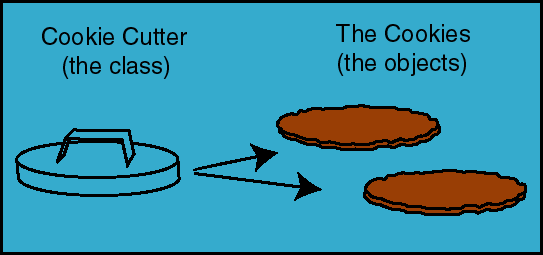
    Pictorial representation of Class and objects


Advantages of EXTjs 5

ExtJS 5
  • Leading Standard for business grade web application
  • Rich UI components
  • One Stop for all rich UI Components
  • Cross browser compatibility
  • Advanced MVC Architecture
  • Plugin free charting
  • Modern UI Plugins
  • Two way binding
  • Routing Functionality
  • Deep linking
  • Build Tools
  • Full documentation suite
  • Built in Animation Support

Serverless vs. Kubernetes: A Beginner's Guide

Serverless vs. Kubernetes: A Beginner's Guide Trying to decide between serverless and Kubernetes? Here's a simple breakdown: 🔹 Choo...