Showing posts with label angularjs. Show all posts

Monday, March 28, 2016

Difference between "=", "@" and "&" - Angular JS


All three bindings are ways of passing data from your parent scope to your directive's isolated scope through the element's attributes:
  1. @ binding is for passing strings. These strings support {{}} expressions for interpolated values. For example: . The interpolated expression is evaluated against directive's parent scope.
  2. = binding is for two-way model binding. The model in parent scope is linked to the model in the directive's isolated scope. Changes to one model affects the other, and vice versa.
  3. & binding is for passing a method into your directive's scope so that it can be called within your directive. The method is pre-bound to the directive's parent scope, and supports arguments. For example if the method is hello(name) in parent scope, then in order to execute the method from inside your directive, you must call $scope.hello({name:'world'})
I find that it's easier to remember these differences by referring to the scope bindings by a shorter description:
  • @ Attribute string binding
  • = Two-way model binding
  • & Callback method binding
The symbols also make it clearer as to what the scope variable represents inside of your directive's implementation:
  • @ string
  • = model
  • & method
In order of usefulness (for me anyways):
  1. =
  2. @
  3. &

There are three ways scope can be added in the directive:
  1. Parent scope: This is the default scope inheritance.
The directive and its parent(controller/directive inside which it lies) scope is same. So any changes made to the scope variables inside directive are reflected in the parent controller as well. You don't need to specify this as it is default.
  1. Child scope: directive creates a child scope which inherits from the parent scope if you specify the scope variable of the directive as true.
Here, if you change the scope variables inside directive, it wont reflect in the parent scope, but if you change the property of a scope variable, that is reflected in the parent scope, as you actually modified the scope variable of the parent.
Example,
app.directive("myDirective", function(){

    return {
        restrict: "EA",
        scope: true,
        link: function(element, scope, attrs){
            scope.somvar = "new value"; //doesnot reflect in the parent scope
            scope.someObj.someProp = "new value"; //reflects as someObj is of parent, we modified that but did not override.
        }
    };
});
  1. Isolated scope: This is used when you want to create scope that does not inherit from the controller scope.
This happens when you are creating plugins as this makes the directive generic, since it can be placed in any html and does not gets affected by its parent scope.
Now, if you dont want any interaction with the parent scope, then you can just specify scope as empty object. like,
scope: {} //this does not interact with the parent scope in any way
Mostly this is not the case as we need some interaction with the parent scope, so we want some of the values/ changes to pass through. For this reason we use:
1. "@"   (  Text binding / one-way binding )
2. "="   ( Direct model binding / two-way binding )
3. "&"   ( Behaviour binding / Method binding  )
@ means that the changes from the controller scope will be reflected in the directive scope but if you modify the value in the directive scope, the controller scope variable will not get affected.
@ always expects the mapped attribute to be an expression. This is very important; because to make the “@” prefix work, we need to wrap the attribute value inside {{}}.
= is birectional so if you change the variable in directive scope, the controller scope variable gets affected as well
& is used to bind controller scope method so that if needed we can call it from the directive
Advantage here is that, the name of variable need not be same in controller scope and directive scope.
Example, directive scope has a variable "dirVar" which syncs with variable "contVar" of the controller scope. This gives a lot of power and generalisation to the directive as one controller can sync with variable v1 while another controller using the same directive can ask dirVar to sync with variable v2.
Below is the example of usage:
The directive and controller are:
 var app = angular.module("app", []);
 app.controller("MainCtrl", function( $scope ){
    $scope.name = "Harry";
    $scope.color = "#333333";
    $scope.reverseName = function(){
     $scope.name = $scope.name.split("").reverse().join("");
    };
    $scope.randomColor = function(){
        $scope.color = '#'+Math.floor(Math.random()*16777215).toString(16);
    };
});
app.directive("myDirective", function(){
    return {
        restrict: "EA",
        scope: {
            name: "@",
            color: "=",
            reverse: "&"
        },
        link: function(element, scope, attrs){
           //do something like
           $scope.reverse(); 
          //calling the controllers function
        }
    };
});
And the html(note the differnce for @ and =):
<div my-directive
  class="directive"
  name="{{name}}"
  reverse="reverseName()"
  color="color" >
</div>

Sunday, September 6, 2015

Why Angular JS


  • Allows to write Single page application in better way.
  • Its a structural framework, to create dynamic web apps.
  • Uses HTML as template , let developer to extend HTML syntax.

Wednesday, July 15, 2015

Angular JS - What is $rootScope?

  1. $Scope is a javascript object associated to controller.
  2. Controller constructor function is responsible for setting the properties and methods to the $scope object.
  3. Methods and properties are created in the $Scope object are only accessed from the controller(Html view).
  4. $rootScope  is a javascript object which is parent of all $scope object.
  5. All other scopes are descendant scopes of the root scope.
  6. $rootScope object could communicate across the scopes.


<body ng-app="sampleApp">
    <div ng-controller="AppCtrl1" style="border:1px solid blue; padding:5px">
     Hello {{msg}}!
     <br />
     Hello {{name}}! (rootScope)
    </div>
    <br />
    <div ng-controller="AppCtrl2" style="border:1px solid green; padding:5px">
     Hello {{msg}}!
     <br />
     Hey {{myName}}!
     <br />
     Hi {{name}}! (rootScope)
    </div>
    <script src="angular.js"></script>

     <script>
     var app = angular.module('sampleApp', []);
     app.controller('AppCtrl1', function ($scope, $rootScope) {
     $scope.msg = 'World';
     $rootScope.name = 'Angular JS';
     });
     app.controller('AppCtrl2', function ($scope, $rootScope) {
     $scope.msg = 'Astute JS';
     $scope.myName = $rootScope.name;
     });
     </script>


Saturday, June 20, 2015

Advantages of Angular JS

  1. Data Binding - Angular JS provides two way binding is automatic synchronization of the data between model and view.
  2. Extensible - AngularJS is customized and extensible . Allows you to create customizable components.
  3. Code Reusability and Maintainability - AngularJS forces you to write code in modular way. Variables and functions can only be created to the respective component(Controller). Provides service and factory implemetation to use across the controllers.
  4. Compatibility - AngularJS is compatible to all major browsers
  5. Testing - AngularJS is designed to be testable so that you can test your AngularJS app components as easy as possible. It has dependency injection at its core, which makes it easy to test.

Tuesday, June 16, 2015

Angular JS Services

  •   In Angular, Services are the business logic can be shared across the controllers.
  •   Services needs to be injected(dependency injection) to make use of it in any component.
  •   Services instantiates only when component demands (Lazy instantiation).
  •   Services are Singleton, single reference shared across the components.
  •   Services can have their own dependencies similar  declaring dependencies in a controller.
 

  <body ng-app="myApp">
     <div ng-controller="myController"> {{message}} <br />
     <input type="text" ng-model="sqr" ng-init="sqr=5"> Square of      <b>{{sqr}}</b> =   {{squareCtrl(sqr)}}
     </div>
  </body>

 
  <script>
  var myApp = angular.module('myApp',[]);
 
     // Service logger to log
     myApp.factory("logger", function() {
       return function(v) {
          console.log(v);
       }
     });
 
     // Square service for square arithmetic operation
     myApp.factory("square", [ "logger", function(logger) {

       return function(v) {
         // Service looger dependency injected to this service   
         logger("Square root for : " + v);
          return v * v;
       }
     }]);
 
    myApp.controller('myController', ['$scope', 'square', function($scope, square) {
 
     //Property to the scope
     $scope.message = 'Hello!';
   
     //Behaviour to the scope
     $scope.squareCtrl = function(v) {
        return square(v);
     };
   
  }]);
  </script>


Monday, June 15, 2015

Angular JS - Controllers

  •   In Angular JS Controller is the Javascript constructor function. 
  •   When directive ng-controller is added to the DOM, Angular create a   constructor function to the controller.
  •   And creates variable $scope to the respective controller.
 
  <body ng-app="myApp">
     <div ng-controller="myController"> {{message}} <br />
     <input type="text" ng-model="sqr" ng-init="sqr=5"> Square of      <b>{{sqr}}</b> = {{square(sqr)}}
     </div>
  </body>

 
  <script>
  var myApp = angular.module('myApp',[]);
  myApp.controller('myController', ['$scope', function($scope) {

     //Property to the scope
     $scope.message = 'Hello!';
   
     //Behaviour to the scope
     $scope.square = function(v) {
        return v * v;
     };

  }]);
  </script>

Sunday, June 14, 2015

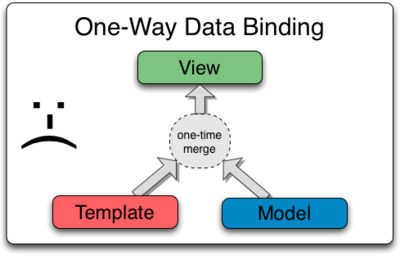
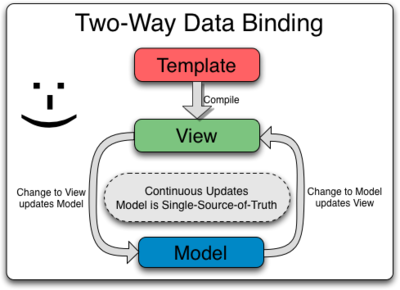
Angular JS Data Binding

Traditional One Way Binding


Angular JS Two Way Binding


  1. In Angular JS two way binding is automatic synchronization of the data between model and view. 
  2. Following sample will help you to understand better.

<body ng-app ng-init="firstName = 'Sathish'; lastName = 'kumar';">
  <strong>First name:</strong> {{firstName}}
  <strong>Last name:</strong> <span ng-bind="lastName"></span>
  Set the first name: <input type="text" ng-model="firstName"/>
  Set the last name: <input type="text" ng-model="lastName"/>

</body>


Above Code binds the value in the view {{ firstName}} and ng-bind="lastName", When value is entered in the following input box
   <input type="text" ng-model="firstName"/>
   <input type="text" ng-model="lastName"/>

In Angular JS two way binding  can be acheived without writing any javascript events on the DOM object.


  1.  ng-app - Defines the Angular JS template in the HTML markup for the application.
  2.  ng-init - Initialize the data in the give variable  .
  3.  ng-model  - Model is nothing but a variable stored in the scope.
  4.  ng-bind - Binds the model/variable data in the specified DOM. 

AngularJS Concetps


Please find the following significant concepts of the Angular JS

1. Template

HTML acts as the template engine with additional markups.

2. Directives

Extends the HTML DOM with the custom attributes .

3.Model

The values that are stored in variables on the scope are referred to as the model

4.Scope

Block or context in the HTML. So that Model is stored where controllers and directives can access it.

5.Expressions

An expression in a template is a JavaScript-like code snippet that allows to read and write variables. Note that those variables are not global variables. Just like variables in a JavaScript function live in a scope,

6.Compiler

When Angular starts your application, it parses and processes this new markup from the template using the compiler.

7.Filter

A filter formats the value of an expression for display to the user

8.View

The loaded, transformed and rendered DOM is then called the view.

9.Data Binding

Whenever the input values change, the value of the expressions are automatically recalculated and the DOM is updated with their values. The concept behind this is two-way data binding.

10.Controller

Business logic behind views.
The purpose of controllers is to expose variables and functionality to expressions and directives.

11.Dependency Injection

Creates and wires objects and functions

12.Injector

Dependency Injection (DI) is a software design pattern that deals with how objects and functions get created and how they get a hold of their dependencies. Everything within Angular (directives, filters, controllers, services, ...) is created and wired using dependency injection. Within Angular, the DI container is called the injector.

13.Module

To use Dependency Injection, there needs to be a place where all the things that should work together are registered. In Angular JS, this is the purpose of the modules.

14.Service

View-independent logic from the controller into a service, so it can be reused by other parts of the application as well. Can be accessed from the different controllers.

Saturday, June 13, 2015

AngularJS - Hello World

  • Angular JS is a javascript opensource powerful framework.

  • Angular JS provides us the efficient way to create Single Page Application (SPA).

  • Angulars JS  lets you to extend traditional HTML.

  • Extensible and works well with the other libraries.


    MVC WAY


  • Angular JS helps you to  write clean MVC (Model View Controller) Javascript code.
  • It uses HTML has the template language, by extending the DOM attributes.


Angular JS Hello World

  Like any other framework Angular JS also needs to be added in the script tag src 
<head>
  <script src="https://ajax.googleapis.com/ajax/libs/angularjs/1.2.5/angular.min.js"></script>
</head>

ng-app

Tells the framework that the HTML block is Angular application.

<body ng-app="myapp" ></body>

ng-model

Intended to be put inside of form elements and has two-way data binding ($scope -> view and view -> $scope)  

<input type="text" ng-model="uname" >

{{ }} Declaration

Specifying the Angular JS variables inside the HTML tags.
  
<h1>{{ uname }}</h1>

Hello World 

  1. <!doctype html>
  2. <html ng-app>
  3. <head>
  4. <script src="https://ajax.googleapis.com/ajax/libs/angularjs/1.3.16/angular.min.js"></script>
  5. </head>
  6. <body>
  7. <div>
  8. <label>Name:</label>
  9. <input type="text" ng-model="uname" placeholder="Enter a your name">
  10. <hr>
  11. <h1>Hello {{uname}}!</h1>
  12. </div>
  13. </body>
  14. </html>
 

Serverless vs. Kubernetes: A Beginner's Guide

Serverless vs. Kubernetes: A Beginner's Guide Trying to decide between serverless and Kubernetes? Here's a simple breakdown: 🔹 Choo...